

Implemented improved VirusTotal queries with file uploads if the file has not been previously scanned by VirusTotal. This is used in the d7x Examine File ability, available either through d7x Shell Extensions for Windows Explorer, through either KillEmAll or KillEmAll GUI, or through d7x Malware Search Tool. Configure on the d7x Config > Admin tab. This ability requires you to bring your own VirusTotal API key, learn how to obtain one here (you simply register […]
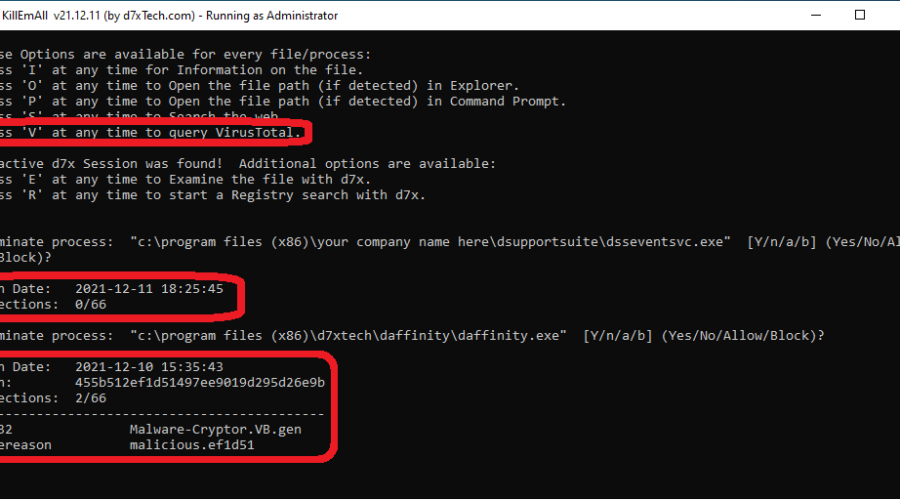
Added Debug mode option to Press ‘V’ to query VirusTotal. Requires a VirusTotal API key, learn how to obtain one here (you just need to register an account with the VirusTotal Community.) The option will only appear in Debug mode when you have the API key configured in KillEmAll Configuration. Get KillEmAll here (d7x users, just check for updates!) Get KillEmAll here (d7x users, just check for updates!)
Added the command line version of KillEmAll.exe to the d7x root path by default. This can be disabled (meaning it will stay in the .\d7x Resources\ subdirectory by default) by going to d7x the Config > Session tab and uncheck KillEmAll from the top of the first tab page. KillEmAll configuration is stored with your d7x config, but configured separately (press ‘C’ after running KillEmAll.exe to configure; although the settings are different, the allow list […]
This is an even larger release than yesterday, with more major functionality introduced! Added an Allow list, so programs on this list will not be terminated. You can add to the Allow list either by pressing ‘A‘ in Debug mode, or through KillEmAll Configuration. Added ability to Block programs from execution, meaning they cannot run. This is a system-wide setting and takes effect even after KillEmAll is closed. Add to the Blocked programs by pressing […]
Plenty of new features and fixes in the last few KillEmAll releases since v21.11.26 released and posted about on the 26th, see below. v21.11.29 (released today, November 29th, 2021) Added the option to Press ‘R‘ to Run KillEmAll again after any KillEmAll process termination run, in addition to ‘D‘ for Debug mode, ‘C‘ for Config, and ‘U‘ to check for updates. Pressing ‘L‘ to save the log file when prompted will automatically save the entire […]
Added self-update capability – at the startup prompt Press ‘U’ to update KillEmAll. Added configuration capability – at the startup prompt Press ‘C’ to access the configuration interface with several options, including: “Always Run as Administrator” on startup and You now have a choice of Web Search engines (not just Google.) This will save (and require) a KillEmAll.cfg file in the same directory as KillEmAll.exe… Also added Debug mode option to Press ‘A’ at any time to Abort Debug […]
Added “Hide Widgets Button” and “Hide Chat Button” (both for Windows 11) to the Tweaks > Taskbar tab. (These tweaks were also added to the latest build of Tweaky.) Fixed the event log alert (on the System Info tab > Alerts column) not triggering properly on certain non-English systems. Fixed d7x Event Log Viewer not properly displaying Warning or Error event types (when specified) on certain non-English systems. Note also that the dSupportSuite client included […]
Client Software v21.11.25 Fixed event log alerts not triggering properly on non-English systems. Fixed missing anti-virus software (reported as no anti-virus software installed) in the PC Health section of Heartbeat emails. Added ability to show user an alternate error log that lists the time stamp and event log rule name only (but of course when user submits the error log, the email submission shows the full event log details.) Config > Notifications > View Errors […]
Added the following event logs to the monitoring rules capability: Microsoft-Windows-Windows Defender/Operational Useful to log/email malware detection events, e.g. Event ID’s 1116 (malware/pup detection) and 1117 (malware remediation/quarantine/removal) Microsoft-Windows-Windows Firewall With Advanced Security/Firewall Useful to log/email intrusion detection events or problems with software not bypassing the firewall. Microsoft-Windows-WindowsUpdateClient/Operational Useful to log/email Windows Update errors. Additional custom logs can be added upon request, but the logs added (above) are by far the most useful outside […]
Added Data Backup > Disk Imaging (Backup) tab which creates proprietary backup image files (non-VHD) which can be restored to bare metal; currently integrated only with TeraByte Unlimited Image for Windows. Added the same functionality as a d7x internal function which can be added to any custom app list on any tab (search for either TeraByte, backup, image, etc. to find it.) On the Disk Imaging (Create VHD) tab: Added an ‘Open Path’ button Added […]
Latest News
-
Windows 11 Optimizer v25.12.18.0 v25.12.18.0 Release Notes Additions: Bitlocker (Windows 11 Pro) and Drive...
Read More -
Windows 11 Optimizer v25.12.9.0 v25.12.9.0 Release Notes Fixes: TPM not properly detected on some...
Read More -
Windows 11 Optimizer v25.11.19.0 v25.11.19.0 Release Notes General Additions and Fixes: Added Info drop...
Read More -
Windows 11 Optimizer Release Notes (Week 1) and What Went Wrong in Carey Holzman’s First Live Stream My apologies for the long post, but it’s all directly...
Read More -
Uncle Carey’s Windows 11 Optimizer (Release) Uncle Carey’s Windows 11 Optimizer was conceived by Carey Holzman and developed by...
Read More -
Spring Sale: 70% OFF d7x 1yr & CryptoPrevent Bulk 70% OFF d7x Annual (1st Year Only) or 1 Year...
Read More -
CryptoPrevent v23.5.5.0 just released! v23.5.3.0 Fixed an issue sending email with Office 365 SMTP...
Read More -
d7x v23.1.12 Release Notes Resolved an issue where DataGrab would backup everything except your...
Read More -
d7x v22.8.10 Release Notes Resolved an issue with the “Reset Networking” and “Repair Winsock”...
Read More -
d7x v22.8.9 Release Notes Resolved an issue with the “Set Time Zone” feature on...
Read More

