


(repost) CryptoPrevent version 21.7.23 adds a new setting for “Controlled Folder Access” which is not a CryptoPrevent protection but a newer protection provided by Windows 10 and Windows 11, so the setting will now appear in CryptoPrevent on these operating systems. We’ve determined that when configured properly, Controlled Folder Access works very well with CryptoPrevent to block unknown ransomware threats. It works by blocking all unknown applications from accessing data in protected folders on your […]
CryptoPrevent v21.7.1 has been released and is ready for update for all premium copies of CryptoPrevent, or the latest version can be downloaded for installation from the main page here (look for the download button on the right.) Added new ‘ShadowGuard’ protection to protect volume shadow copy data from deletion, and to terminate any application that attempts to do so. Added new maintenance features (Clear the Windows Store Cache, and Create a System Restore Point […]
Updated various d7x functions for the Windows 11 Insider Preview, particularly repairs involving Windows services among more minor things. Removed support for Windows 10 service repairs on all versions PRIOR to 1903. The Tweaks > Desktop > Desktop Icons > Recycle Bin was not being detected as enabled if the setting had never been toggled off/on before.
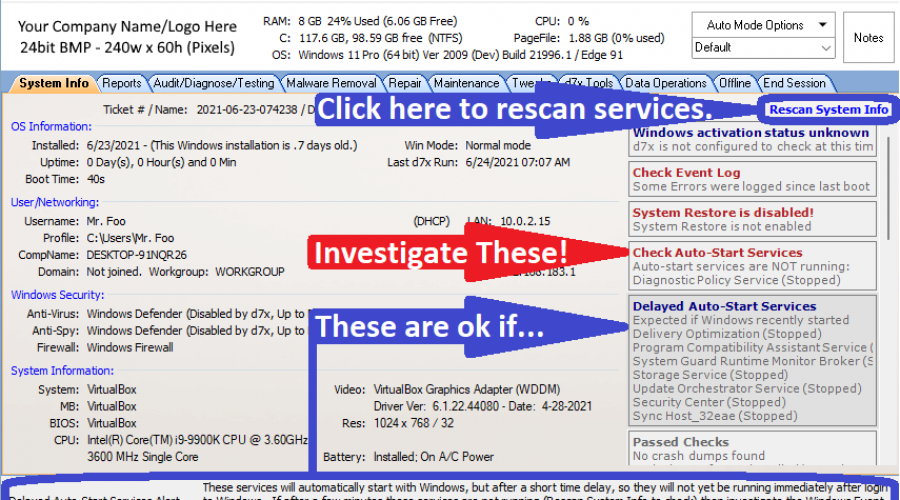
The “Check Auto-Start Services” alert on the System Info tab now alerts only for services that are set to start automatically (excluding any delayed auto-start services, whereas previously they were included.) This will mean the alert only pops up when you ACTUALLY should look into the issue, and never because you just restarted Windows and delayed auto-start services haven’t yet had the opportunity to start. As such, this alert is now RED when triggered. Delayed […]
Corrected a recent issue with the last few versions reporting a 32bit OS when it was actually 64bit. More updates to the Repair Windows Update functionality for Windows 10! Updated various repair functionality requiring repair to Windows services for all versions of Windows, including the addition of repairs for the current leaked Windows 11 build. Windows 10/11 version display now shows the display version and the release ID, ex: 20H2 (2009) v21.6.23.1 Fixed potential file […]
I just received report of a Lockdown user not being able to download files in Chrome or Edge (Chromium) with no blocking reported in the event logs. Thanks to Luke for the report and solution, v1.1.2 has been uploaded to include a new default path in the whitelist rules for “%programdata%\Microsoft\Windows Defender” because executables in there were being used to scan file downloads, rather than their counterparts in %programfiles%, I guess.
Updated Windows Update Repair routines for Windows 10. v21.6.19.x (Repost) Updated to recognize Windows 11. Corrected an issue with Windows Server 2019 and later versions being reported as Server 2016. Since there is no build number difference between Server 2019 and Server v1809 all instances of Windows Server beyond 2016 should now display as simply Windows Server with the build, e.g. “Windows Server 20H2” The Windows version display will once again turn red when a […]
d7x Auto Mode previously only resumed automatically after a reboot when running Auto Mode from the Malware tab; now it resumes after reboot if running from all tabs except the Tweaks tab. d7x will no longer prompt to enable Auto Login to Windows when starting Auto Mode if there is only one user account on the system other than administrator/guest/built-in service accounts.
Updated delete temp internet files, history, and cookies routines to include the Brave web browser’s BETA and NIGHTLY builds, Edge DEV and CANARY channels, and Chrome BETA and DEV channels. Also updated delete temporary internet files to include the GPU cache for Chromium based browsers, and the newer Firefox cache2 and other cache folders in newer builds of Firefox. An update to the d7x Run > options code means you can now launch apps in […]
d7x Event Log Viewer improvements: – You can now display both System and Application event logs in the same results window simultaneously. – It now remembers your previous settings when you close/re-open the Event Log Viewer and/or d7x. – Scan results now display with the most recent event appearing first in the list, not last. d7x Malware Search Tool, KillEmAll/dUninstaller, and the Event Log Viewer all display a consistent branding in the window titlebar, copied […]
Latest News
-
Windows 11 Optimizer v25.12.18.0 v25.12.18.0 Release Notes Additions: Bitlocker (Windows 11 Pro) and Drive...
Read More -
Windows 11 Optimizer v25.12.9.0 v25.12.9.0 Release Notes Fixes: TPM not properly detected on some...
Read More -
Windows 11 Optimizer v25.11.19.0 v25.11.19.0 Release Notes General Additions and Fixes: Added Info drop...
Read More -
Windows 11 Optimizer Release Notes (Week 1) and What Went Wrong in Carey Holzman’s First Live Stream My apologies for the long post, but it’s all directly...
Read More -
Uncle Carey’s Windows 11 Optimizer (Release) Uncle Carey’s Windows 11 Optimizer was conceived by Carey Holzman and developed by...
Read More -
Spring Sale: 70% OFF d7x 1yr & CryptoPrevent Bulk 70% OFF d7x Annual (1st Year Only) or 1 Year...
Read More -
CryptoPrevent v23.5.5.0 just released! v23.5.3.0 Fixed an issue sending email with Office 365 SMTP...
Read More -
d7x v23.1.12 Release Notes Resolved an issue where DataGrab would backup everything except your...
Read More -
d7x v22.8.10 Release Notes Resolved an issue with the “Reset Networking” and “Repair Winsock”...
Read More -
d7x v22.8.9 Release Notes Resolved an issue with the “Set Time Zone” feature on...
Read More

