

New setting: Load Previous Tab on startup! d7x Config > Behavior/Updates tab > Startup Behavior section (top left) > Go directly to tab: Previous Tab. With this set d7x will always startup on the last tab you were on when you last ran d7x (unless you are in Auto Mode, then of course it starts to the current tab for that Auto Mode.) Previous Tab is the new default d7x behavior, but existing configs will […]
Moving the mouse over the System Info tab > Alerts column now specifies in the description box if the alert has an associated action or not; if so the description states that you can double-click the alert to perform an associated action (it is not specific as to what the action is, however.) KillEmAll now shows in the titlebar if it has been started with SYSTEM/TrustedInstaller privileges. Malware Search Tool changes: The Registry Hijacks tab […]
Malware Search Tool changes: Added a basic description of how to use the File System and Registry Inspection tabs when you first start the tool. Added hover tips to the File System and Registry Inspection tabs’ listbox on the left to describe what the currently selected node is designed to scan. The floating Details window when shown (see the View drop down menu) will now stay on top of other windows. It will also now […]
d7x Event Log Viewer now opens faster (takes the same time to scan, but the UI opens now before scanning is complete.) d7x Registry Search windows now display when they are running under the Local System/TrustedInstaller account in the titlebar. Malware Search Tool changes: The button to search registry was broken and did nothing (fixed), as did the file system search (removed.) Added option to search registry as system/trusted installer if not already running as […]
Updated d7x (and default custom apps) today to address a problem downloading CPU-Z and GPU-Z. Both custom apps have been updated to reflect a download URL of “d7x://” indicating that d7x is using special download logic to retrieve the file, which in each case above is more than just downloading a single file. CPU-Z would be ok with a standard download URL, but since the URL/filename is constantly changing with updates, d7x needs to determine […]
Added ability to configure your Fab’s AutoBackup v7 Pro order information (click the configure button on the Fab’s tab.) d7x will write this information to the blank copy of Fab’s that it automatically downloads, registering it so that it functions as the full version of the software rather than the trial version. This means you never have to worry about keeping *your* copy of Fab’s with you, as d7x will always register the generic download […]
With the latest AMD chipset driver software v3.09.01.140 released on 9/13/2021, the AMD software installer fails to update the registry with the new version number upon installation. As a result, Uncle Carey’s AMD Chipset Notifier will continually notify you of a new version, because it doesn’t know if you have installed it already. It is unknown at this time if there are other issues related to installing the driver over-top itself with this month’s update, […]
Fixed: the Offline tab’s “Disable BSOD AutoReboot & Enable Minidumps” functionality which was not performing the tweaks on the selected offline partition, but instead was operating on the currently active/online OS. Change: “Edit Offline Registry” on the Offline tab now launches RegEdit as System/TrustedInstaller to bypass ownership/permissions issues, because there is absolutely no reason for needing the current user view when the intent is to work with an offline registry. Added checks and prevention of […]
Added ability to Blacklist (for deletion) both files and registry entries in Malware Search Tool (click the drop down arrow on the Delete button for the options) as well as the ability to blacklist files from the “Examine File(s)” dialog in d7x (which appears either through double-clicking a file in Malware Search Tool or when right-clicking on a file in the file system and selecting “Examine File”.) Blacklisted items will appear in the definitions lists […]
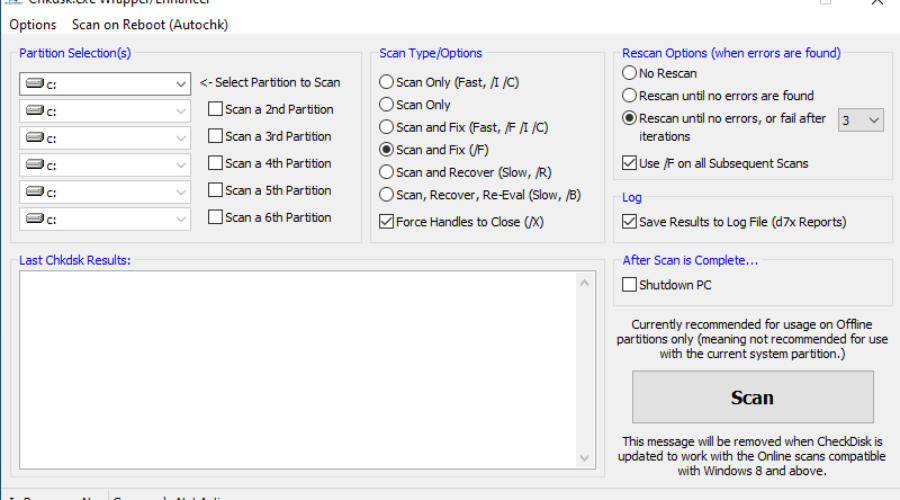
The new old thing: CheckDisk (Chkdsk.exe Wrapper/Enhancer) has been re-implemented into the d7x Offline tab. (Functionality includes running chkdsk.exe as many times as it takes until it returns no errors; run chkdsk on multiple partitions, etc.) Currently this is intended for offline usage only, and while it can be used on ‘Online’ partitions, it will not take advantage of the new Windows 8+ ‘Online’ scan and fix features which don’t require unmounting the volume to […]
Latest News
-
Windows 11 Optimizer v25.12.18.0 v25.12.18.0 Release Notes Additions: Bitlocker (Windows 11 Pro) and Drive...
Read More -
Windows 11 Optimizer v25.12.9.0 v25.12.9.0 Release Notes Fixes: TPM not properly detected on some...
Read More -
Windows 11 Optimizer v25.11.19.0 v25.11.19.0 Release Notes General Additions and Fixes: Added Info drop...
Read More -
Windows 11 Optimizer Release Notes (Week 1) and What Went Wrong in Carey Holzman’s First Live Stream My apologies for the long post, but it’s all directly...
Read More -
Uncle Carey’s Windows 11 Optimizer (Release) Uncle Carey’s Windows 11 Optimizer was conceived by Carey Holzman and developed by...
Read More -
Spring Sale: 70% OFF d7x 1yr & CryptoPrevent Bulk 70% OFF d7x Annual (1st Year Only) or 1 Year...
Read More -
CryptoPrevent v23.5.5.0 just released! v23.5.3.0 Fixed an issue sending email with Office 365 SMTP...
Read More -
d7x v23.1.12 Release Notes Resolved an issue where DataGrab would backup everything except your...
Read More -
d7x v22.8.10 Release Notes Resolved an issue with the “Reset Networking” and “Repair Winsock”...
Read More -
d7x v22.8.9 Release Notes Resolved an issue with the “Set Time Zone” feature on...
Read More

